
 mysql
mysqlMySQL的安全问题从安装开始说起
当你安装 MySQL 完后、会有个提示: [root@localhost Desktop]# rpm -ivh MySQL-server-5.5.28-1.rhel5.i386.rpm Preparing... ###################...
当你安装 MySQL 完后、会有个提示:
[root@localhost Desktop]# rpm -ivh MySQL-server-5.5.28-1.rhel5.i386.rpm
Preparing... ########################################### [100%]
1:MySQL-server ########################################### [100%]
PLEASE REMEMBER TO SET A PASSWORD FOR THE MySQL root USER !
To do so, start the server, then issue the following commands:
/usr/bin/mysqladmin -u root password 'new-password'
/usr/bin/mysqladmin -u root -h localhost.localdomain password 'new-password'
Alternatively you can run:
/usr/bin/mysql_secure_installation
**对于这 2 种方式、我个人认为、mysql_secure_installation 比较好用***
which will also give you the option of removing the test
databases and anonymous user created by default. This is
strongly recommended for production servers.
**我觉得、这里的关键应该是能够把匿名用户给删掉***
See the manual for more instructions.
Please report any problems with the /usr/bin/mysqlbug script!
By default, a MySQL installation has an anonymous user, allowing anyone
to log into MySQL without having to have a user account created for
them. This is intended only for testing, and to make the installationgo a bit smoother.
You should remove them before moving into a production environment
**匿名用户的危害****
所以、生产环境请务必删之!!
我选择 mysql_secure_installation
[root@localhost Desktop]# mysql_secure_installation
NOTE: RUNNING ALL PARTS OF THIS SCRIPT IS RECOMMENDED FOR ALL MySQL
SERVERS IN PRODUCTION USE! PLEASE READ EACH STEP CAREFULLY!
In order to log into MySQL to secure it, we'll need the current
password for the root user. If you've just installed MySQL, and
you haven't set the root password yet, the password will be blank,
so you should just press enter here.
Enter current password for root (enter for none):
OK, successfully used password, moving on...
Setting the root password ensures that nobody can log into the MySQL
root user without the proper authorisation.
You already have a root password set, so you can safely answer 'n'.
Change the root password? [Y/n] n
... skipping.
By default, a MySQL installation has an anonymous user, allowing anyone
to log into MySQL without having to have a user account created for
them. This is intended only for testing, and to make the installation
go a bit smoother. You should remove them before moving into a
production environment.
Remove anonymous users? [Y/n] y
... Success!
Normally, root should only be allowed to connect from 'localhost'. This
ensures that someone cannot guess at the root password from the network.
Disallow root login remotely? [Y/n] n
... skipping.
By default, MySQL comes with a database named 'test' that anyone can
access. This is also intended only for testing, and should be removed
before moving into a production environment.
Remove test database and access to it? [Y/n] n
... skipping.
Reloading the privilege tables will ensure that all changes made so far
will take effect immediately.
Reload privilege tables now? [Y/n] y
... Success!
Cleaning up...
All done! If you've completed all of the above steps, your MySQL
installation should now be secure.
Thanks for using MySQL!
本站内容来源于网络,如有侵权请与我们联系,我们会及时删除,我们深感抱歉!
注:本站所有信息仅供用于网络技术学习参考,学习中请遵循相关法律法规!
本文地址: https://v30.fanwenzhu.com/sql/mysql/991.shtml
上一篇:SQL查询超时的设置方法(关
下一篇:Mysql中文乱码以及导出为
相关文章
热门TAG
win10 ecshop 主机 阿里云 解决 配置 C# C++ 解析 SQL语句 命令 Go语言 方法 CSS3 HTML5 CSS win7 MSSQL 服务器配置 IIS7.5 IIS7 IIS6 IIS CentOS 7 Linux oracle数据库 oracle phpcms discuz discuz教程最新文章
-
 这些文件如果在configure命
时间:2021-01-22
-
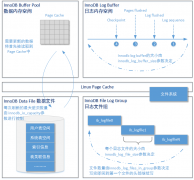 说明在数据库崩溃时内存
时间:2021-01-22
-
 破解极验(geetest)验证码
时间:2021-01-22
-
 今天这种代码阅读方法仍
时间:2021-01-22
-
 count(*) as cnt from sakila.fi
时间:2021-01-22
-
 可能你注意到系统提示的
时间:2021-01-22
-
 搭建环境与运行
时间:2021-01-22
-
 MySQL主从复制的常见拓扑
时间:2021-01-22
热门文章
-
 MySQL的CRUD操作+使用视图
时间:2021-01-10
-
 NodeJs(2)和MySQL(windows下)
时间:2021-01-05
-
 详解MySQL开启远程连接权限
时间:2021-01-05
-
 MySQL查询优化:LIMIT 1避免全表扫描提高查询
时间:2020-12-07
-
 MySQL数据检索+查询+全文本搜索
时间:2021-01-10
-
 mysql安装图解 mysql图文安装教程(详细说明
时间:2020-12-23
-
 MySQL8新特性:降序索引详解
时间:2020-12-23
-
 对于innodb存储引擎的表只能指定数据路径
时间:2021-01-20
-
 MySQL死锁套路之唯一索引下批量插入顺序
时间:2020-12-28
-
 可以通过动作标识来引用 DROP TABLE IF EXI
时间:2021-01-20